Companion piece: The Ones She Typed Over — what the same night taught me about what finished work hides.
I finished my computer science degree in 1992 and went straight onto mainframes. For a good while I wrote CICS screens for a living. Green screens on 3270 terminals. PCs with mice existed by then. They had nothing to do with a 3270.
You built a screen by listing out the fields. A label here, an input field there, so many characters wide, protected or not. You wrote the map and the terminal drew it.
My users were data entry people. I went out one day to watch them work. A woman had a stack of paper on a stand next to her terminal. She read off the paper and typed, and she never looked at the screen. Her hands just kept going. The screen filled up next to her and she paid it no mind.
I thought I was watching somebody who was very good at her job. I was. But that wasn't the whole of it, and it took me about thirty years to work out the rest.
The field attribute I'd forgotten I knew
Here is a thing you could do on those maps. You could mark a field to skip on its own. The operator fills the last character of the ZIP code and the cursor jumps to the next field by itself. She doesn't press anything. She just keeps typing and the form moves her along.
There were other choices like that. Which field came after which. Where the cursor landed when the screen came up. Whether she had to reach for anything.
None of it felt like design at the time. It was a line in a map. You set an attribute and moved on.
But somebody had to decide the order of those fields, and for a lot of those screens that somebody was me. I was building the road she was driving on. I didn't think of it that way.
Forty years later
A few weeks ago I had a few hundred rows to get into a web form. Add a row, pick an item off a dropdown, type two numbers, do it again. I handed the job to an agent and went to make tea.
The obvious way to have a machine fill in a form is to describe it the way you'd describe it over the phone. Take a picture of the screen. Find the box. Click there. Type.
It works for about ten rows. Then the page scrolls a little, or a row redraws late, or the dropdown opens upward because it's near the bottom of the window and there's no room underneath. And the click lands somewhere else.
That would be fine if it failed loudly. It doesn't. A click that hits nothing gives you an error and you try again. A click that hits the wrong box tells you it worked. The tool clicked. It clicked a spot on the glass, which is all it ever promised to do. Whether anything on the page agreed to be clicked is a different question and nobody answers it.
So I came back to a form that looked finished. Rows filled in, numbers everywhere, and no way to tell which ones were real.
I spent the next hour making the clicking smarter. Measure again after every scroll. Wait longer before clicking. Take a fresh picture each time. Every one of those was a sensible fix. That's how you stay inside a bad idea for an hour without ever deciding to.
Somewhere in there I thought about the woman with the paper on the stand.
She wasn't looking at the screen. So she wasn't finding anything by where it was.
What she was actually doing
She was pressing Tab.
I stopped guessing at pixels and spent four minutes mapping the tab order instead. Press Tab, ask the page which box has focus now, write it down, press Tab again.
It came out as a loop. Pick an item off the dropdown and focus goes back to the search box with the old text already cleared. Shift-Tab twice and you're in the quantity box. Tab forward into the price box and it hands you the value already highlighted, so what you type replaces it and you never delete anything. One more Tab and you're back at the search box for the next row.
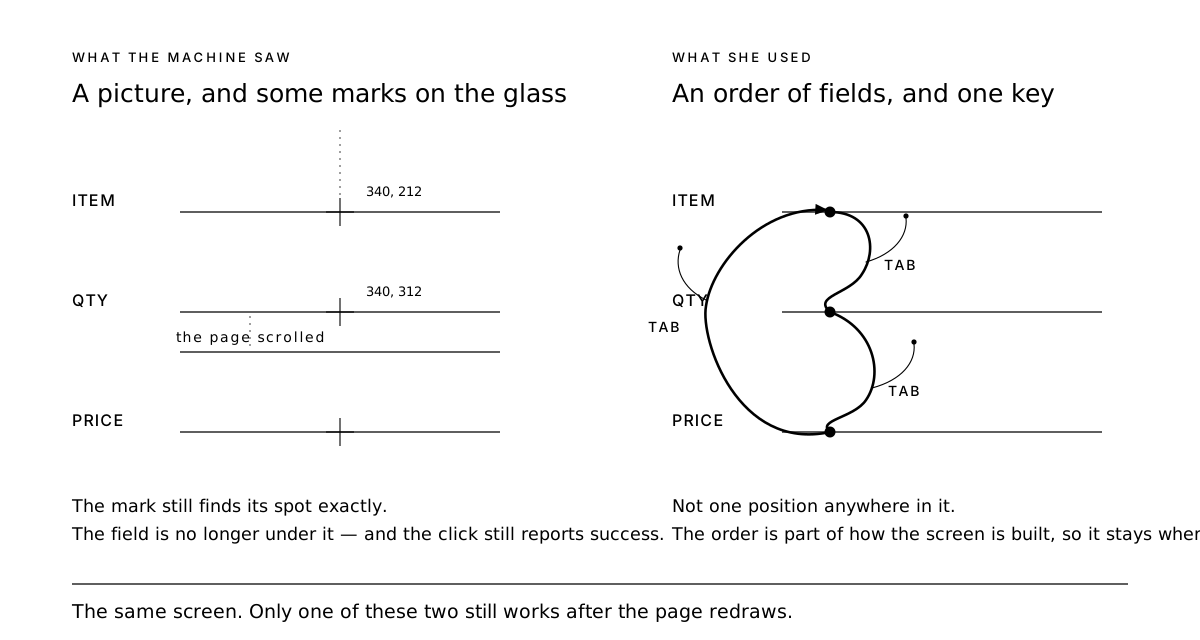
Somebody built that on purpose. The price field handing you its contents already selected is the same idea as the ZIP code that skips on its own. Somebody pictured a person doing this two hundred times before lunch.
I put the agent in that loop and the mistakes stopped. It also ran about three times faster, which I'd stopped caring about by then.
A coordinate is a guess about how a page got painted, and pages repaint whenever they like. The tab order is part of how the document is built. It stays where it is.
The part that stung is that I knew this. I had built exactly this, for exactly these people, and I'd spent an hour trying to teach a machine to point at things instead.
The lesson I nearly took home
Earlier that same night I'd tried a different keyboard trick and it had gone badly.
Type in the search box, then press Down, Down, Enter to grab the second thing on the list. It worked, and then twice it opened a "create a new item" dialog instead, because sometimes the list finished loading with that option already highlighted. My two Downs started counting from somewhere I hadn't assumed.
I decided keyboards were unreliable and went back to clicking. That was the hour.
But that isn't what broke. The tab order is part of the document. It's a promise the page makes. "The second thing on a list that's still loading" is not a promise, it's a guess, and it went wrong the same quiet way a pixel coordinate goes wrong. I'd been bitten by one thing twice and gone looking for two.
Who deserved the credit
I watched that woman and gave all of it to her. Years of practice, very fast hands.
Her speed was real. But it could only take that shape — eyes on the paper, hands moving, nothing to reach for — because the form underneath her was built for it. Put her in front of a screen where the cursor jumps around at random and the practice buys her almost nothing. She'd be looking down like the rest of us.
Some of her expertise lived in her. Some of it lived in my map.
There's one more turn. Those 3270 screens had no mouse, so there was no other way to build them. Everything had to be reachable in order, by key, or the screen was useless. Then the web came along and made everything visual, and that guarantee went away.
What put it back was accessibility work. People spent years arguing that software has to be operable without a mouse and without sight — screen readers, keyboard-only operation, switch devices. That's mostly why a modern web form still has a sane tab order at all.
So the most reliable way I've found to get a machine to use a web page is to use the parts that were built so a person wouldn't have to look at it. Which is the same thing I was building in the nineties, for a woman who never looked at hers.